Embedding a voicer on your website
Embed a voicer on your own website the way you would embed a video: visitors answer without leaving your page, and the one voice blends live inside it.
# What an embedded voicer is Creator plan
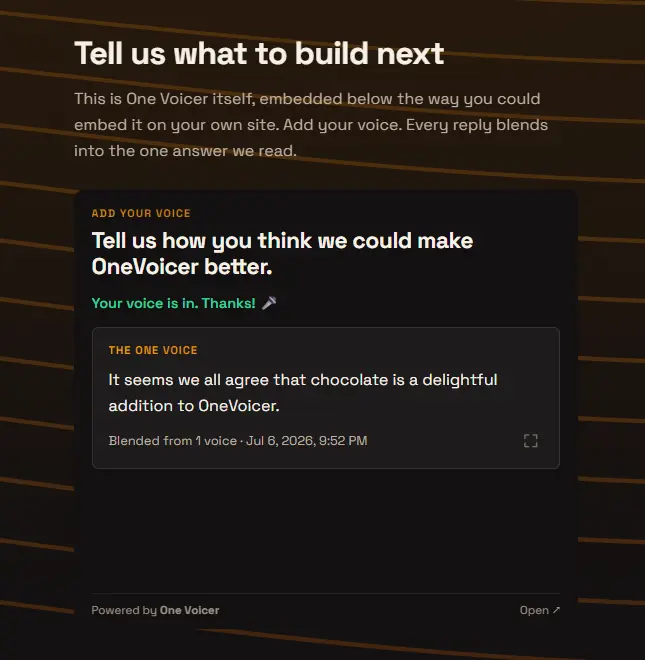
Embedding puts a live voicer inside your own web page, the way you would embed a video. Visitors read the question, add their voice, and watch the one voice re-blend, all without leaving your site. It is the same voicer as everywhere else: the voices it collects show up in the app, count toward the same blend, and land in the same history.
Visitors answer right in the frame with no account and no app, and after they answer, the live one voice appears in place. It is built for a feedback box on your site, a running question on a community page, or a public pulse on a blog post.
# Turning embedding on Creator plan
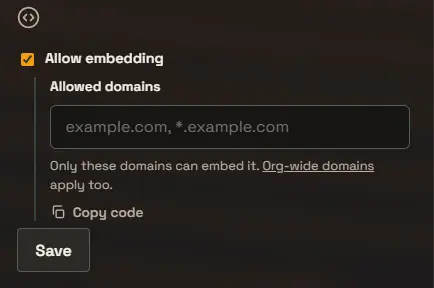
On your voicer’s page, open the Share it panel and select the <> icon to unfold “Embed on your site.” Tick Allow embedding, enter your allowed domains, and Save. Copy code puts the embed snippet on your clipboard: one iframe tag you paste into your page’s HTML, wherever you want the voicer to appear.
Embedding is off until you turn it on, per voicer, so nothing becomes embeddable by accident.
# Allowed domains
The allowed domains list is what keeps your embed yours. Only pages on the domains you list can display the voicer; on any other site the frame simply refuses to load, enforced by the visitor’s own browser. So even though the embed code is visible to anyone who views your page’s source, copying it onto a site you did not approve gets them a blank box.
List bare domains like example.com, or use a wildcard like *.example.com to cover every subdomain. The share link itself is unaffected: people you send it to can always answer on the OneVoicer page, embed or no embed.
Two details save the most head-scratching. First, the embedding page must be served over https; the allowlist compiles to secure origins, so a plain http page can never match, whatever you list. Second, hosts match exactly: example.com and www.example.com are different origins, and the *.example.com wildcard covers subdomains only, never example.com itself. The safe list is the bare domain plus www, or the bare domain plus the wildcard.
# Org-wide domains Agency plan
On the Agency plan, your org page adds an org-wide domain list. Domains there apply to every voicer in the org that has embedding turned on, on top of each voicer’s own list. Set your sites once and every embed-enabled voicer can live on them, while client-specific domains stay on the individual voicer.
# Who can answer inside the embed
An open voicer works in the embed exactly as it does on the share page: anyone can add a voice right in the frame, no account needed.
A voicer that requires sign-in cannot take answers inside a frame on another site, by design: browsers do not share sign-in with embedded pages. The embed says so and offers an “Add your voice on OneVoicer” link that opens the full page in a new tab, where the visitor signs in and answers as usual.
# Frequently asked
Which plan includes embedding?
Embedding is available on the Creator plan and up. Org-wide embed domains, one list that covers every embed-enabled voicer in your org, come with Agency. See the pricing page for the full comparison.
Can someone copy my embed code and put my voicer on their site?
Not on a site you have not approved. The embed only displays on domains in your allowed list; anywhere else the browser refuses to render the frame. They could still share your voicer’s link directly, which is the same as you sharing it.
Do visitors need an account to answer in the embed?
No, an open voicer takes answers right in the frame with no account. Only a voicer set to require sign-in sends visitors to the full OneVoicer page to answer, since sign-in cannot happen inside an embedded frame.
Why is the embed a blank box on my own site?
Almost always one of two things. The page showing the embed is not served over https (the allowlist only ever matches secure pages), or the allowlist entry does not match the page’s exact host: www.example.com is not example.com, and a *.example.com wildcard covers subdomains only, never the bare domain. Serve the page over https and list the bare domain plus the www form (or the bare domain plus the wildcard).
Does the embedded answer update live?
Yes. After a visitor adds their voice, the one voice appears in the frame and keeps re-blending as new voices arrive, the same live view as the app.
Can I change the size of the embed?
Yes. The snippet is a standard iframe. Its width is fluid and fills its container by default; adjust the width and height attributes in the code to fit your layout.