Putting a voicer on your live stream
The stream overlay puts a live voicer in a corner of your stream: the QR code viewers scan and the one voice beside it, re-blending on screen as answers arrive.
# What the overlay puts on your stream
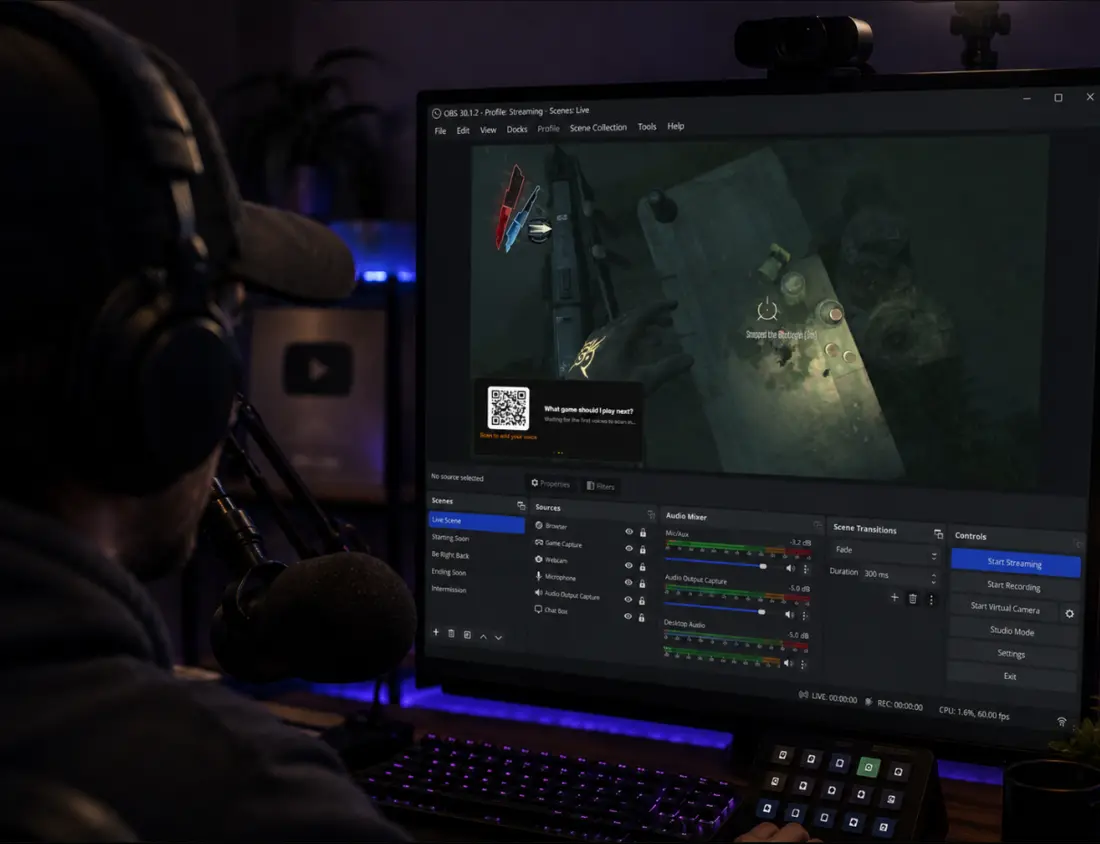
The overlay is a compact card built to take the smallest possible corner of your stream, and it cycles gently instead of showing everything at once. The QR code viewers scan leads on its own, then slides aside as your question joins it, and then the live one voice takes the card before the cycle starts again. The page behind it is transparent, so the card composites cleanly over gameplay or a camera, and the answer keeps re-blending on screen as voices arrive. There is nothing to refresh and nothing to alt-tab to.
Viewers answer on their own phones in the browser, with no app and no account. It is the same voicer as everywhere else: the voices your stream collects show up in the app, count toward the same blend, and land in the same history.
Because the overlay is part of your video, every viewer sees it on every platform, in clips, and in the VOD. The overlay is available on every plan.
# Getting the overlay URL
On your voicer’s page, open the Share it panel and select the broadcast icon to unfold “Stream overlay (OBS),” then select Copy overlay URL. That URL is the whole feature: there is nothing to configure and nothing to sign into, because the share link token in the URL is the only credential. That is also why it works inside OBS, which keeps no OneVoicer session.
The URL works whether or not the voicer is live, but a voicer only collects voices while it is live, so remember to go live before you start the stream.
The overlay is offered for voicers with text answers, which is the default. A voicer set to image answers does not have a stream overlay yet, so the broadcast icon only appears on text voicers.
# Adding it in OBS
In OBS, add a source to your scene and choose Browser. Paste the overlay URL, set the width to 500 and the height to 225, and select OK. Drag the card to whichever corner suits the scene; resizing the source scales the whole card, so make it as large as your layout allows. The bigger the QR code appears in the final video, the easier it scans off a screen, and the QR holds the card longest in the rotation so viewers have time to aim a phone at it.
Any streaming tool with a browser source works the same way, including Streamlabs and OBS-based suites, and because the overlay is baked into your video it rides along to every platform you stream to, whether that is Twitch, YouTube, or Kick.
# Helping viewers answer
Viewers watching on a desktop or TV scan the QR code with their phone, exactly like a room scanning a slide. Viewers watching on their phone cannot scan their own screen, so give them a tappable path too: pin the voicer’s share link in chat, or add it to a chatbot command. It is the same link the QR code encodes, from the Copy link button in the Share it panel.
# While you stream
The overlay looks after itself during a broadcast. It reconnects on its own after a network blip, and it survives scene switches, including OBS’s “shutdown source when not visible” setting, because the URL carries everything it needs.
When the question has run its course, hide or remove the browser source, or take the voicer offline in the app. A voicer that is offline stops collecting voices, and people who scan late see that it is not taking answers right now.
# Watching responses on the time series
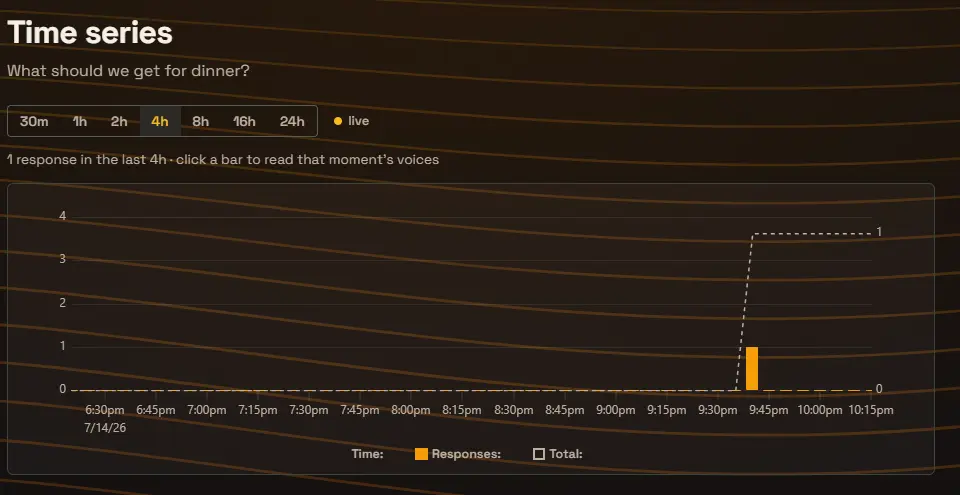
To see when responses arrive, open the time series: on your voicer’s page, it is the small bar chart icon at the bottom of the Voices panel. Each bar counts the responses that landed in a slice of the window you pick, from the last 30 minutes to the last 24 hours, and a dashed line keeps the running total for the window. The page refreshes itself every 30 seconds, so on a second monitor it answers the mid-stream question: did calling it out on air just move the room?
Click any bar to read exactly what arrived in that moment. After the stream, the longer windows show the shape of the night: the spike when the overlay first went up, the bump when you pinned the link in chat, the quiet stretch during the boss fight.
# Frequently asked
Do my viewers need an account to answer?
No. Viewers scan the QR code, or tap the share link you pin in chat, and answer in their phone browser with no app and no sign-up. If you want one verified answer per person, you can require sign-in on the Creator plan.
Does it work on YouTube or Kick, or only Twitch?
Everywhere. The overlay is part of your video, so it shows on any platform you stream to, in clips, and in the VOD, with no platform integration involved.
How do viewers on phones answer if they cannot scan their own screen?
Pin the voicer’s share link in chat or put it in a chatbot command. It is the same link the QR code encodes, and one tap opens the answer page.
Which plan includes the stream overlay?
Every plan, including the free Starter plan. Plan limits still apply to the voicer itself, such as how many voices it can collect. See the pricing page for the comparison.
Why don’t I see the broadcast icon on my voicer?
The stream overlay is available for voicers whose answer format is text, which is the default. A voicer set to image answers does not offer the overlay yet.
Why does the page look odd in a normal browser tab?
The overlay’s background is transparent on purpose, so it composites over your stream. Opened in a regular tab it shows the card on a plain page with a short note about adding it to OBS. That is expected.