Record and reset: daily or weekly, and history
Turn one voicer into a series: on a daily or weekly schedule the blend is recorded to history and the voices reset for a fresh start. Past periods stay browsable.
# What record and reset does Creator plan
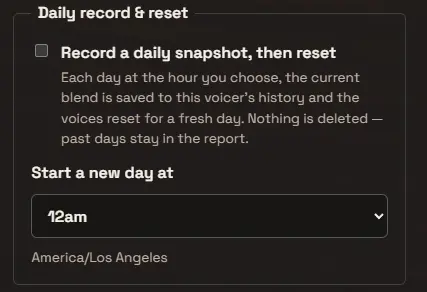
Record and reset turns a single voicer into a rhythm. On the schedule you choose, daily or weekly, the current one voice is saved to the voicer’s history and the voices reset for a fresh period. Nothing is deleted: past periods stay in the report and the earlier voices remain, they simply stop feeding the new period’s blend.
Daily is built for a question you ask the same crowd every day, a daily standup mood, a class exit ticket, a “what should we ship today,” where each day deserves its own clean answer.
Weekly suits a slower crowd or a standing question, a team retro, a community suggestion box, a “how can we make this better” that gathers voices all week. Each recorded week reads like a digest: one blended answer for the whole week, week after week.
A reset is a clean slate for your crowd, not just for you. Someone who added a voice in the last period can add a fresh one in the next, so a standing question keeps gathering new answers day after day or week after week instead of holding people to a single response for the life of the voicer.
# Choosing your schedule
The Reset picker sets the cadence and the rollover hour, for example daily at 12am, in your own timezone, which is shown beside the picker (like America/Los Angeles). At that hour the snapshot is taken and the reset happens automatically, whether or not you are online.
Choose weekly and a weekday picker appears, so you decide which day the week rolls over, for example weekly on Monday at 12am. Pick the rollover that lands the fresh blend right before you read it: the morning of your standup, your board meeting, your newsletter.
You do not have to be there for it to fire. The rollover runs on its own and is recorded once per period.
# Saving a snapshot on demand
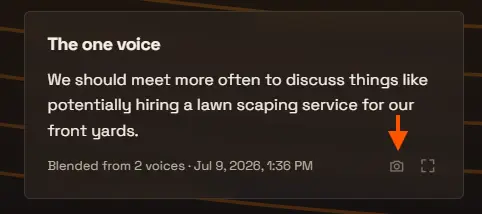
You can also record a period whenever the moment is right, without waiting for the schedule. Next to the one voice on your voicer’s page there is a small “Save a snapshot to history” control: it records the current blend to history and resets the voices, exactly like a scheduled rollover, but right now. A confirmation asks first, since saving also resets.
It works even if the scheduled reset is off entirely. That makes it a milestone tool on your own terms: you just wrapped a workshop, the answer is worth keeping, save it and start fresh for the next group. Snapshots taken this way sit in the same history report as scheduled ones.
Two guardrails: a snapshot needs a blended one voice to record, so the control refuses while the voicer has no answer yet, and you can save one on-demand snapshot per day. If a scheduled rollover is armed, it keeps running on its schedule regardless, so an afternoon snapshot simply ends the period early and the evening rollover records whatever arrived after it.
# Browsing history
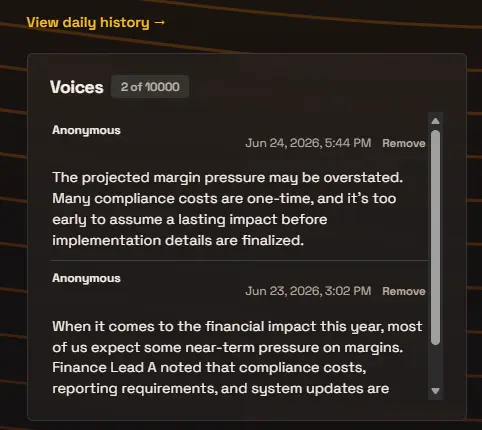
Once any period has been recorded, by the schedule or by an on-demand snapshot, a View history link appears above the Voices panel. It opens a report with one entry per period: the one voice that was recorded for that day or week. Expand an entry for the full blend, Show voices to read every voice from that period, and a Deep dive link to analyze it retroactively. Daily entries are labelled with their day (“Wed, Jun 24”), weekly entries with their span (“Jun 22 – 28”). A scheduled period with no answers still gets a row, so the timeline stays continuous.
The history is a running archive of how your crowd’s answer shifts over time, each period keeping its blend, its voices, and its own deep dive.
# Frequently asked
If someone answered in the last period, can they answer again in the new one?
Yes. With record and reset on, each period is a fresh start: a person who voiced yesterday (or last week) can add a new voice today, whether they answer anonymously or sign in. Within a single period they still get one voice (signed-in answers can be edited if you allow it).
Are voices deleted when the period resets?
No. Nothing is deleted. The period’s one voice is recorded to history, and the voices that fed it remain on the voicer, simply excluded from the next period’s blend, which starts fresh.
Can I record a snapshot without the daily or weekly schedule?
Yes. The “Save a snapshot to history” control next to the one voice records the current blend and resets, on demand, even with the schedule off. It needs a blended answer to record and allows one on-demand snapshot per day. On-demand and scheduled snapshots share the same history report.
Should I pick daily or weekly?
Match the rhythm of the question. Daily fits a crowd you hear from every day: a standup, a class, a shift. Weekly fits a slower or larger crowd, a team retro or a community suggestion box, where a week of voices makes one satisfying digest. You can change the cadence later without losing history.
What timezone does the reset use?
Your timezone, shown beside the schedule picker. The snapshot and reset fire at the hour (and weekday, for weekly) you choose in that zone, automatically.
Which plan includes record and reset?
Record and reset is available on the Creator plan and up. See the pricing page for the full plan comparison.