Writing your question
The question is the harvest prompt. Here is how to write it, add context, set the answer length, steer the blend with response criteria, and thank respondents with a completion message.
# The question and its details
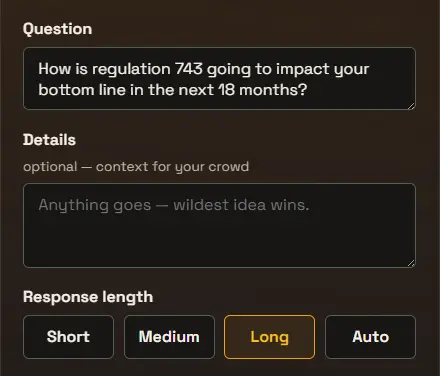
Ask one clear question. The Question field is what the room sees first, so keep it to a single idea they can answer in a sentence or two. After a structure, the question is usually the harvest prompt itself: “What did your table land on?” or “What is the one thing we should do now?” The Details field below it is optional context, a place to frame the question or set the tone without crowding the headline. Details is shown to the people answering and is also read by the AI, so the one voice and the deep dive both know the framing.
You can edit the question at any time, even while the voicer is live. Voices already submitted stay on the list, so it is best to settle the wording before you share widely.
# Response length
Response length tells the AI how long the one voice should be. It does not limit what people type, only how the blended answer reads; the deep dive sets its own length.
Medium, Long, and Auto are available on the Creator plan and up. The free Starter plan blends short answers.
- Short
- A tight, one or two sentence summary. The only length on the free Starter plan.
- Medium
- A short paragraph that captures the main themes.
- Long
- A fuller answer with room for nuance and supporting points.
- Auto
- OneVoicer picks a length that fits how much the room actually said.
# Response criteria Creator plan
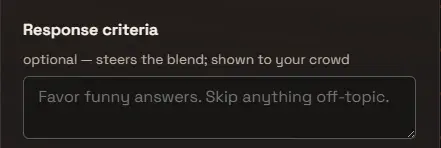
Response criteria is an optional instruction that is added to the blend, so it directly affects the one voice. It is also shown to the room as they answer, so they understand how you are blending the voice of the people. Something like “Favor funny answers. Skip anything off-topic.” pushes the one voice toward the tone and focus you want.
Criteria steers how voices are woven together rather than filtering the list. Every voice is still collected and counted; the criteria only guides the one voice. The deep dive ignores it and reads the voices as they are.
For a facilitated harvest, the most useful criteria ask for clusters instead of a single summary. Something like “Group the responses into three to five clusters. Name each cluster, say roughly how many voices sit in it, and quote the strongest voice under each.” turns the one voice into a clustered read of the room: the kind of affinity grouping you would otherwise do by hand on a wall of sticky notes, ready to put on the stage and discuss. Set Response length to Long or Auto so there is room for the clusters, and keep the criteria visible to the room so they know how their words are being grouped.
# Completion message Creator plan
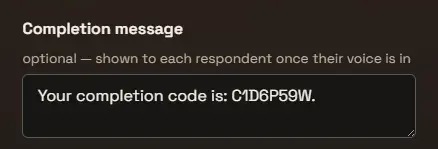
The completion message is an optional note, up to 500 characters, shown to each respondent once their voice is in. Use it for a thank-you, a next step, or a code: a prize code to show at a booth, a discount for taking part, or the completion code a research panel uses to trigger payment.
The key property is when it appears: only after an answer is submitted, never before. That makes it a receipt as much as a message; whoever holds the code gave you a real answer first. It shows wherever the voicer is answered, on the share page and inside an embed.
# Frequently asked
Can I change the question after going live?
Yes. You can edit the question and details at any time. Voices already submitted stay on the list, so finalize the wording before sharing widely if you can.
Does response length limit what people can type?
No. Response length only sets how long the blended one voice is. It does not change the answer box; either way, every voice is capped at 280 characters, so responses stay short.
Can the one voice give me clusters instead of one answer?
Yes. Put the instruction in Response criteria, for example “Group the responses into three to five clusters, name each, and quote the strongest voice under each.” The blend follows it, so the one voice reads as a clustered summary of the room. Use Long or Auto response length to give the clusters room. The deep dive is separate and always runs its six fixed lenses.
Does response criteria filter out answers?
No. Criteria is added to the blend and shapes how the one voice reads, and it is shown to respondents as they answer. It does not remove any voice; every voice is still collected. To exclude a specific answer, remove it from the Voices list.
Can a respondent see the completion message without answering?
No. The completion message appears only once a voice is submitted, so a code you put there is only ever held by someone who actually answered. That is what makes it usable as proof of completion for a prize, a discount, or a paid research panel.