How to add audience feedback to your meetup
Most of your audience leaves without a word. Here’s how to hear them all.
What you’ll learn
- How to get feedback from the whole room in 30 seconds
- What to ask at the start and end of a talk
- How to let the crowd pick next month’s topic
Every meetup organizer reads the room the same way: by the three people who stay to stack chairs. They are lovely, they are loyal, and they are a terrible sample. The first-timer who slipped out at nine, the quiet regular who loved the talk but hates speaking up, the member one mediocre month from drifting away, none of them said a word on the way out, and they are the ones who decide whether the group grows. Hearing them takes thirty seconds of their time and one tablet of yours, starting at the welcome table.
# Put a question on the welcome table
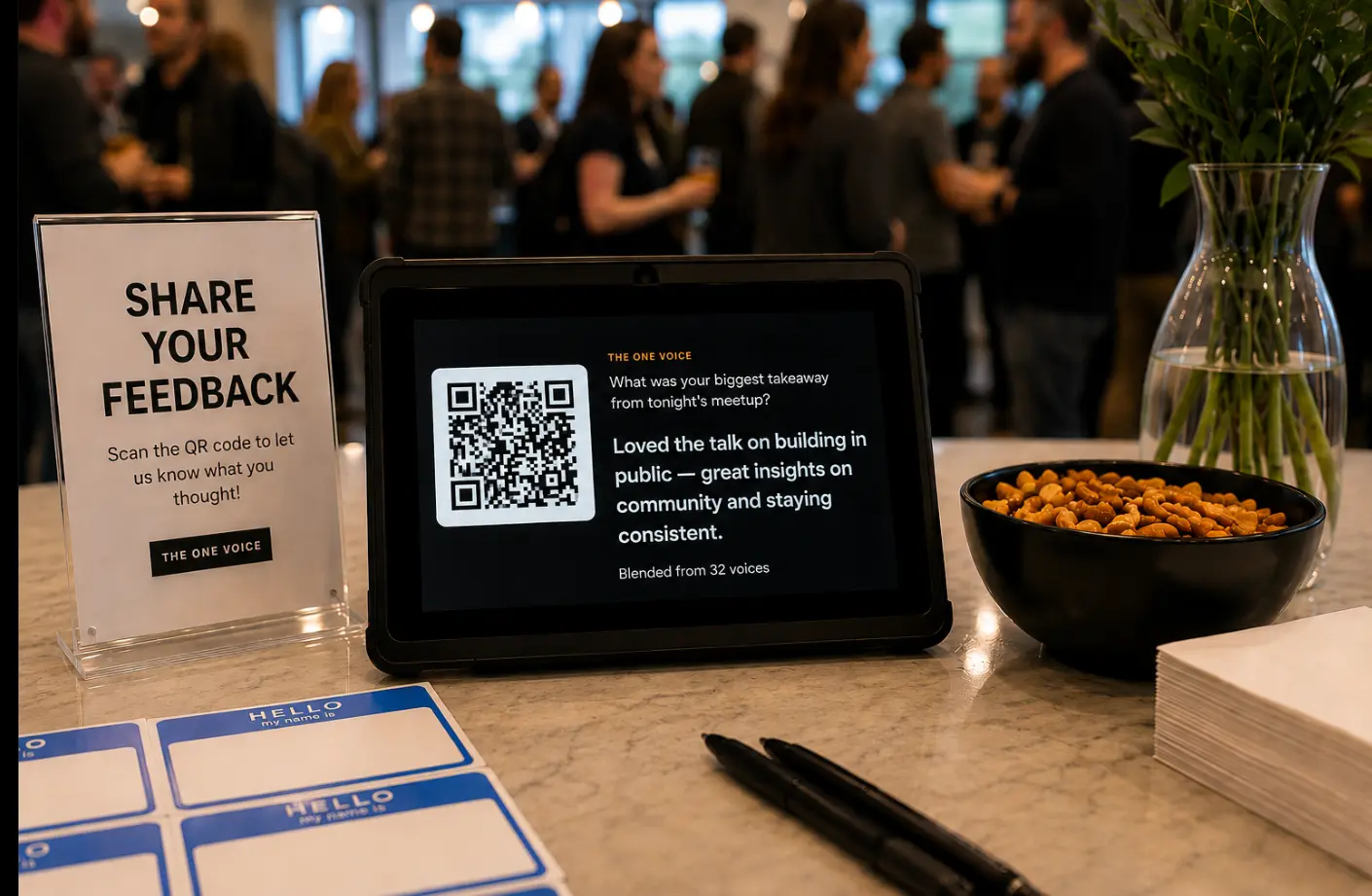
The easiest version takes one tablet and no courage: prop it next to the name tags with a question and a QR code, and let it run all night. People scan while they pour a drink or wait for a slice, answer in a sentence from their own phone, and drop back into their conversation. No app, no account, and nobody has to raise a hand.
The tablet is doing two jobs. It collects, obviously. But it also announces, from the first minute, that this is a group where what you think gets asked for. As answers arrive they are blended into one short summary right on the screen, so even walking past the table shows the room agreeing with itself.
# Thirty seconds, no app
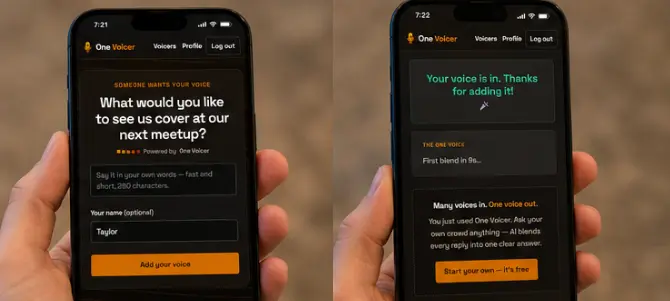
Here is the entire experience from the attendee’s side. Scan the code with the camera and the question opens in the phone browser: nothing to install, no sign-up, and a name field that is genuinely optional. Type a sentence, tap once, done. The confirmation shows the voice is in and the next blend seconds away, and the whole exchange fits inside a drink refill.
That level of friction is the difference between three responses and thirty. Every extra step, a login wall, an app store detour, a ten-field form, costs you answers, and it costs you the shy ones first, which is exactly the half of the room you have never heard from.
# End the talk with the takeaway question

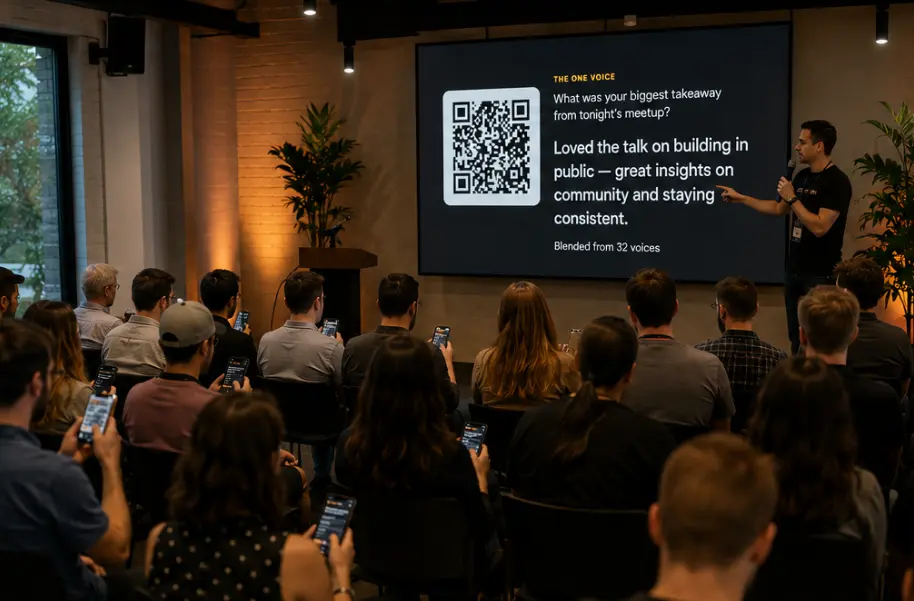
The last slide of the night is usually a thank-you and a logo. Make it a question instead: “what was your biggest takeaway from tonight’s meetup?” with the QR code beside it. People answer while they find their coats, the blended answer forms on the screen in real time, and the evening ends with the room reading its own mind.
Nobody gets more out of this than the speaker. Meetup speakers are volunteers; their pay is knowing it landed. Handing them a paragraph blended from the whole audience beats the two hallway compliments they would otherwise take home, and it makes your next speaker easier to recruit. It also hands you the recap post for the group page, already written in the audience’s own words.
The same close works anywhere someone runs a room. Facilitators of workshops and large-group sessions use the identical move, a takeaway question on the final screen, so the session ends on the group’s own synthesis instead of a thank-you slide.
# Let the crowd pick next month’s topic
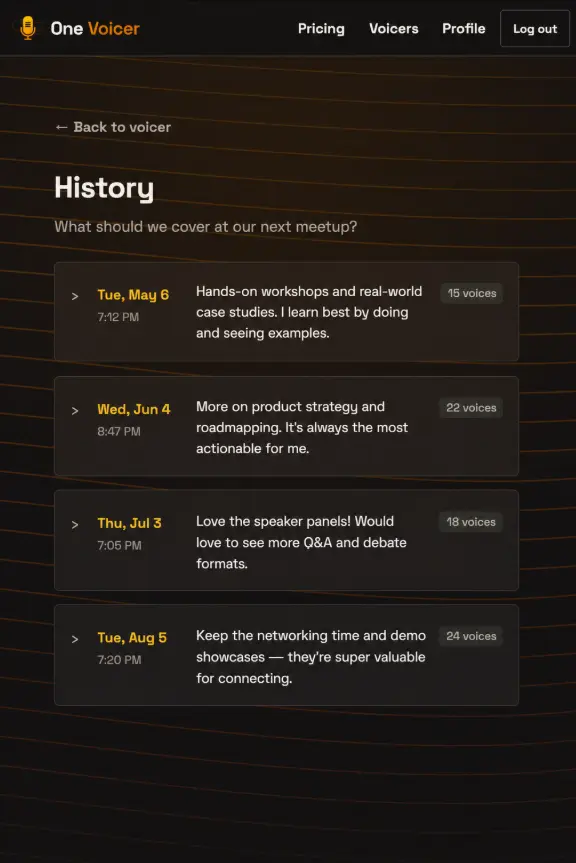
The standing question that earns its spot month after month is “what should we cover at our next meetup?” Leave it open between events, drop the link in the group chat and the recap post, and read the blend when it is time to book a speaker. Programming stops being a guess about what people might want and becomes a reply to what they said.
Because each month’s summary is saved to a history, you also get something most volunteer-run groups never have: a dated record of what the group asked for and how it changed. May wanted hands-on workshops, June wanted product strategy, July asked for more Q&A. That small archive is planning gold, and it is the receipt you show when anyone asks whether this group actually listens.
# Open next month with last month’s answer

The loop closes at the start of the next meetup, with one sentence from the mic: “you asked for hands-on workshops, so tonight is one.” That sentence costs nothing and does more for retention than the pizza budget, because it tells everyone in the room that answering was worth it, and it shows the first-timers what kind of group this is.
Being visibly heard is rarer than organizers assume. Freeman’s 2025 Trends Report found that 78% of event organizers believe they deliver a genuine peak moment while only 40% of attendees recall one, and attendees who do experience one are 85% more likely to come back. This is the part OneVoicer carries for you: it reads every voice and blends them into one clear answer, so closing the loop takes a sentence at the mic, not an evening with a spreadsheet.
# The whole setup, fifteen minutes once
Two questions, created once, reused every month. After the first evening it is a habit, not a project.
- Create two voicers before the meetup One for tonight (“what was your biggest takeaway?”) and one standing planning question (“what should we cover next?”). Print the QR code for the table and put the other on the closing slide.
- Run the welcome table and the closing slide The tablet with the planning question sits by the name tags all night. The takeaway question goes on the speaker’s final slide, and the blend forms while people find their coats.
- Read both blends on the way home Two short paragraphs, not a pile of forms. Send the takeaway blend to the speaker as a thank-you and paste it into the recap post.
- Open the next meetup with the answer Book the topic the blend asked for and say so from the mic. That one sentence is what turns answering into a habit for the whole group.
# Frequently asked
Do attendees need an app or an account?
No. They scan a QR code or tap a link and answer in the phone browser in about thirty seconds. There is nothing to install and no sign-up, and the name field is optional.
Are the answers anonymous?
By default, yes, and for honest feedback that is the right setting: people say more when their name is not attached. If you ever need one verified answer per person, for example a vote you plan to quote, you can require sign-in on that question instead.
What does it cost for a typical meetup?
The free Starter plan runs three live questions with up to 25 voices each, which covers a small group trying the loop for the first time. A larger meetup that fills both standing questions every month fits the Creator plan.
Won’t an anonymous question just collect jokes?
A few, and the good ones are worth keeping. The blend summarizes the whole set of answers, so a joke or two washes out of the summary once sincere answers arrive, and you can always open the individual voices and remove anything that crosses a line.